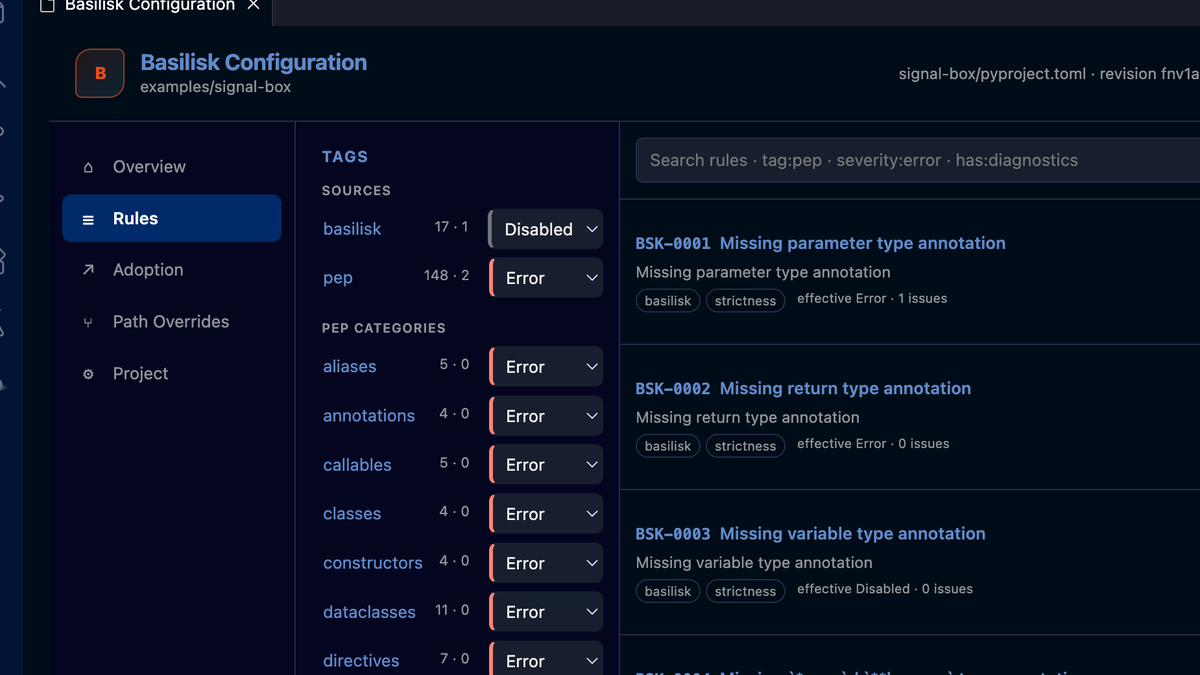
Basilisk now has one Python type checker configuration model that you can read from the file and predict without knowing a preset, mode, or hidden inheritance rule.
The short version is:
pyproject.tomlis the Basilisk-native configuration file;- tags set broad policy, while rule entries make narrow exceptions;
basilisk checkandbasilisk analyzeselect separate rule groups;- a nested
pyproject.tomlscopes policy to a folder; - the editor previews the exact diagnostic impact before changing the file;
- manual configuration edits take effect without restarting the server; and
- Typeshed selection is explicit, verified, and offline during checking.
At publication, the current release is
v0.37.3,
published on 22 July 2026. That patch release fixed the Windows VSIX release
jobs. The configuration experience in its shipped binaries comes from a larger
sequence: the tag-first model landed in
v0.35.0,
then the v0.37 line added reactive configuration and the offline Typeshed
store. This post describes what you get after installing v0.37.3, not what was
changed by the final patch alone.
The behavior below follows the tagged v0.37.3 normative specifications for the configuration model, configuration editor, and Typeshed resolution.
One file, two flat maps
Rule policy lives in two tables:
[tool.basilisk.rules]
"imports_unresolved" = "warning"
"BSK-0050" = "error"

[tool.basilisk.rule-tags]
"basilisk" = "error"
"suppressions" = "warning"
[tool.basilisk.rule-tags] is the broad control. One basilisk = "error"
entry enables the opt-in Basilisk rule family at error severity. A tag can
also target a PEP category such as generics, protocols, or typeddicts.
[tool.basilisk.rules] is the exception layer. A rule entry wins over tag
entries in the same file. If several matching tags apply, the strictest
severity wins: error, then warning, then info, then disabled.
That is the complete rule model. The
v0.35.0 configuration change
removed presets, Inherited and Native severity intentions, rule-family
switches, adoption markers, and the legacy basilisk.json format. Rule codes
also stopped carrying a severity letter: BSK-E0001 became BSK-0001, because
severity belongs to configuration rather than identity.
If you still have basilisk.json, v0.37.3 does not read it. Move its live
settings to [tool.basilisk], translate rule and tag severities into the two
tables above, then remove the inert file. The complete key reference is in the
configuration documentation.
check and analyze have different jobs
There is no --strict dial. The rule registry is partitioned by provenance:
basilisk checkruns everypep-tagged rule;basilisk analyzeruns non-peprules only when configuration gives them a non-disabled severity; and- the language server publishes the union by default.
Configuration grades a PEP rule to error, warning, or info, but cannot
disable it. If rule or tag resolution would make a PEP-tagged rule disabled,
configuration loading fails. Non-PEP rules are genuinely opt-in: without a
matching rule or tag entry, analyze has nothing to report for them.
This distinction keeps the Python typing-spec check separate from project policy. “This call violates the typed contract” and “our team requires an annotation here” no longer arrive from one opaque strictness mode.
When the language server opens a project with no [tool.basilisk] table, it
adds one visible seed once:
[tool.basilisk.rule-tags]
"basilisk" = "error"
The CLI never seeds configuration. In the editor, the line makes the chosen house-rule policy reviewable instead of hiding it in an extension default.
Configure Python type checking in VS Code
The VS Code configuration editor groups the server-owned rule catalog by tag.
It shows the entry stored in pyproject.toml, the resolved effective severity,
and current workspace occurrences. Search can combine rule text with facets
such as tag:pep, severity:error, and has:diagnostics.
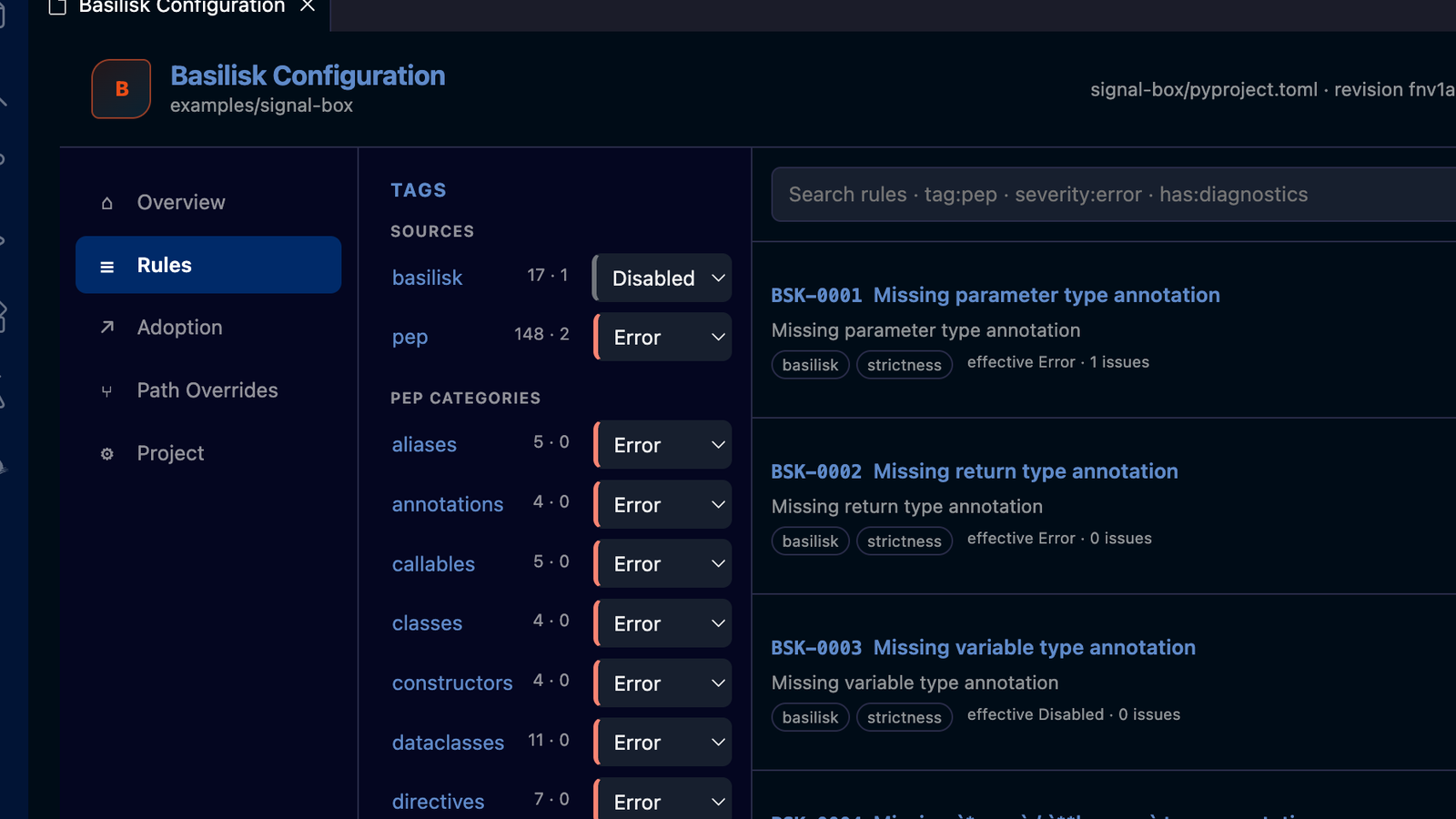
The released Basilisk v0.37.3 VSIX and binary, captured in VS Code 1.130.0 on
macOS Arm64. The Rules view exposes the same tag and rule entries written to
pyproject.toml.
The editor does not maintain a second policy model. The language server owns parsing, resolution, workspace impact, and the proposed edit; the extension renders that information and asks VS Code to apply the edit.
Before a rule or tag change is written, the server checks a hypothetical configuration against the workspace. The preview lists the effective severity changes and the before/after error, warning, and info totals. Applying consumes that exact preview; if the underlying document revision changed meanwhile, the server rejects the stale operation instead of overwriting newer work.
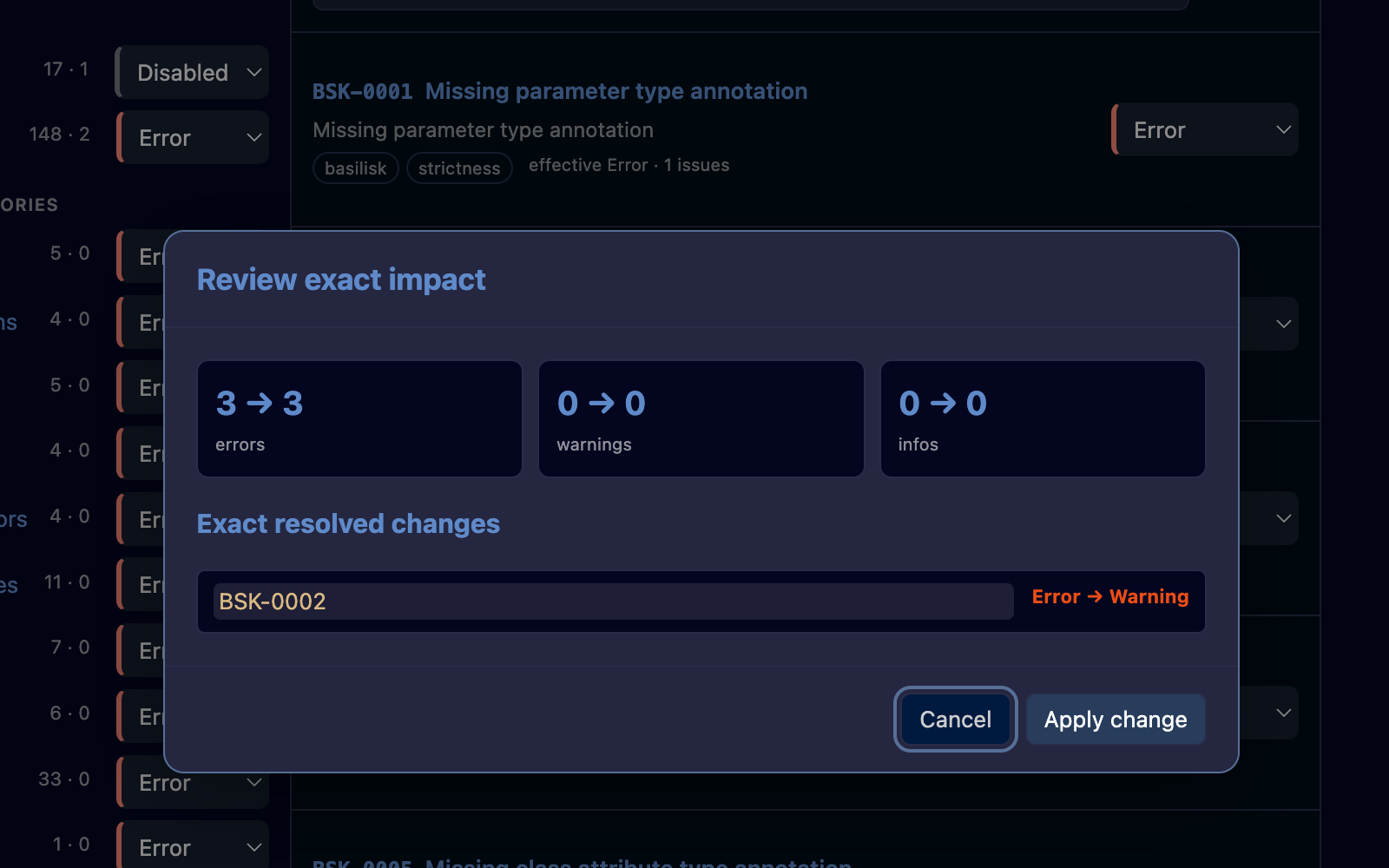
A real v0.37.3 preview. The proposed BSK-0002 change remains unapplied until
the user accepts the exact server-computed impact.
The navigation also includes Overview, Adoption, Path Overrides, and Project. Those views expose server-computed state; they do not add hidden configuration constructs.
Folder configuration replaces glob overrides
Rule policy is resolved for each checked file. Basilisk walks from that file's
directory toward the project root. The nearest [tool.basilisk] table that
decides a rule wins.
For example, a repository can require all Basilisk house rules at its root, then turn one opt-in annotation rule off for tests:
# ./pyproject.toml
[tool.basilisk.rule-tags]
"basilisk" = "error"
# ./tests/pyproject.toml
[tool.basilisk.rules]
"BSK-0001" = "disabled"There are no glob-based per-path rule tables and no per-module exceptions. The
folder containing the nearer pyproject.toml is the scope. The configuration
editor's Path Overrides view lists those discovered folder configurations and
opens their actual files.
Manual edits are reactive in v0.37.3
You can use the UI or edit TOML directly. The language server watches each
workspace root's pyproject.toml, uv.lock, and .python-version. When their
content changes, it reloads configuration, refreshes import resolution,
rechecks the workspace, republishes diagnostics, and notifies clients.
The reactive-configuration implementation
also makes an open, unsaved pyproject.toml buffer authoritative. A change
applied through the editor is reflected in diagnostics before the apply
request returns, while revision checks protect against races with an external
edit.
The practical result is simple: changing a severity by hand should not require “Reload Window,” and using the visual editor should not briefly resurrect a stale value from disk.
Other v0.37 configuration details worth knowing
Three smaller changes remove some easy sources of surprise.
First, a configured exclude list replaces Basilisk's default list; it does
not extend it. Keep any default cache or vendor patterns that your project
still needs alongside custom patterns. Hidden dot-directories remain skipped.
The CLI and language server now apply these
replacement semantics
identically.
Second, Basilisk does not invent a default Python 3.12 target. Unless
python-version is explicit, the project version comes from .python-version,
then the lower bound of [project].requires-python, then the lower bound in
uv.lock. If none provides evidence, version-dependent rules stay silent.
Platform selection is separate; python-platform = "All" keeps analysis
cross-platform.
[tool.basilisk]
python-version = "3.12"
python-platform = "All"
Third, Pyright-compatible analysis-environment configuration accepts Pyright's
singular string key, stubPath. That compatibility applies to import and stub
resolution, never to Basilisk rule severities:
[tool.pyright]
stubPath = "typings"
Basilisk's native stub-paths list also remains available. If both forms are
present, the native list wins. These contracts are defined in the
v0.37.3 configuration-file specification.
Typeshed configuration is offline by design
The v0.37 line also changed how Basilisk obtains standard-library types.
Checking never downloads a stub tree. basilisk check, basilisk analyze, and
the language server resolve one local source:
- the bundled Typeshed snapshot when no explicit source is configured;
- an exact commit already present in the verified local store; or
- a custom folder selected with
typeshed-path.
The relevant keys are:
[tool.basilisk]
# typeshed-commit = "<full 40-character commit SHA>"
# typeshed-store-path = ".cache/typeshed"
# typeshed-path = "vendor/typeshed"
typeshed-commit and typeshed-path are mutually exclusive. A configured pin
that is absent or corrupt fails closed with a visible NO SOURCE error; it
does not silently switch to another tree. The
v0.37 offline-store change
separated downloads from checking, and the following
NO SOURCE change made a
missing source an explicit editor error.
Downloads happen only when requested:
basilisk typeshed download
basilisk typeshed download --commit
The first command resolves the latest python/typeshed@main, verifies and
stores it, then writes the resolved SHA as the workspace pin. The second
materialises the SHA already named by shared configuration and does not change
the file. Equivalent Download latest and Download pinned actions appear in the
configuration editor.
If you tried a partial v0.36 or v0.37 build, the experimental typeshed-url,
typeshed-cache, typeshed-cache-path, and typeshed-verify keys are not part
of the released model. Use typeshed-store-path only to relocate the verified
store; it does not select a different standard-library source.
A migration checklist
When upgrading an older Basilisk project to v0.37.3:
- Move Basilisk-native configuration into
[tool.basilisk]inpyproject.toml;basilisk.jsonis inert. - Replace presets and inherited/native intentions with explicit entries in
rulesandrule-tags. - Remove the severity letter from Basilisk rule codes: use
BSK-0001, notBSK-E0001. - Replace glob rule overrides with a nested
pyproject.tomlin the folder that needs a different policy. - If you used the experimental Typeshed cache/network keys from a partial
v0.36 or v0.37 build, replace them with
typeshed-commit,typeshed-store-path, ortypeshed-pathas appropriate. - Remove
auto-stub-modeandauto-stub-path; stub-generation mode is now a command choice such asbasilisk stubs generate --mode hybrid, not project configuration. - If you set
exclude, re-add every default pattern you still want because the configured list replaces the defaults. - Open Basilisk: Open Configuration Editor, preview one deliberate change, and confirm the resolved impact before applying it.
The point of the redesign is not a prettier settings screen. It is that the screen, the CLI, the language server, and the TOML now describe the same small model.
Install the latest Basilisk release, then see the full configuration reference for every project and Typeshed key.
Frequently asked questions
How do I configure Basilisk 0.37.3?
Put Basilisk settings in pyproject.toml under [tool.basilisk]. Use
[tool.basilisk.rule-tags] for groups of rules and
[tool.basilisk.rules] for individual rule severities.
What is the difference between basilisk check and basilisk analyze?
basilisk check runs the PEP-tagged typing-spec rules. basilisk analyze
runs only non-PEP rules that configuration enables. The language server
publishes the union by default.
Can Basilisk disable a PEP typing rule?
No. A PEP-tagged rule can be graded to error, warning, or info, but
resolving one to disabled makes configuration invalid. Non-PEP analysis
rules can be disabled.
Does Basilisk reload pyproject.toml automatically?
Yes. In v0.37.3 the language server watches pyproject.toml, uv.lock, and
.python-version for each workspace root and refreshes analysis when their
content changes.
Does type checking download Typeshed?
No. Checking and language-server analysis are offline. Typeshed downloads
happen only through explicit editor actions or basilisk typeshed download.