Configuration Reference
[tool.basilisk] in pyproject.toml is the only configuration source. For
each file it checks, Basilisk walks up from the file's directory and visits
every ancestor pyproject.toml that carries a [tool.basilisk] table. A
pyproject.toml without the table contributes nothing and does not stop
the walk.
What the visited tables combine to, and how:
- Rule severities are never merged. The nearest table that decides a rule wins outright — see Severity resolution.
- Non-rule settings (paths, versions, typeshed keys) resolve per key: the
nearest file that sets the key wins, keys a nearer file doesn't set come
from the ancestors.
stub-pathsis the one additive key — entries append, deduplicated.
Migrating from
basilisk.json? The legacy root-levelbasilisk.jsonfile is not read by anything — it is inert, and the configuration editor does not surface it at all. Translate its keys into[tool.basilisk](camelCase → kebab-case, e.g.typeshedPath→typeshed-path), move its per-rule and per-tag severities into[tool.basilisk.rules]and[tool.basilisk.rule-tags], then delete the file.
Zero configuration
Basilisk needs no configuration file at all. With no [tool.basilisk] table
anywhere on the walk:
- Every core PEP conformance rule runs at
errorseverity. Basilisk's own opt-in house rules stay off — that is exactly whatbasilisk checkdoes, every run. - Files are discovered from the current directory.
- The target Python version is resolved from your project files:
.python-version, then the[project].requires-pythonlower bound, then theuv.lockrequires-pythonlower bound. - Standard-library stubs come from the bundled
python/typeshed snapshot compiled into
the binary — fully offline, with an
typeshed_source_unpinnedadvisory until you pin a commit — see Standard-library stubs.
In an editor, that state is seeded once — the CLI never writes configuration, the LSP does. When a workspace root's walk finds no
[tool.basilisk]table, the language server writes the two-line strict-by-default seed into the root'spyproject.toml— creating the file if the project has none — before the first analysis (LSPARCH-CONFIG-SEEDING):[tool.basilisk.rule-tags] "basilisk" = "error"So an editor session starts with every house rule on at
error— visibly, in your file, as one line you can grade down or delete. Seeding happens once: any[tool.basilisk]table on the walk blocks it, including the empty table left behind when you delete the entry. That is the one place where a missing table and an empty table differ.
Full configuration example
[tool.basilisk]
python-version = "3.12" # only consulted where a PEP is version-dependent
python-platform = "All" # explicit cross-platform analysis
stub-paths = ["stubs/"] # resolution step 1: prepend extra .pyi stub dirs
include = ["src/", "tests/"]
exclude = ["**/migrations/**", "**/generated/**"]
cache = true # reuse check results between runs
# cache-dir = "build/bsk-cache" # or: put the cache somewhere else
# typeshed-commit = "<full 40-char commit SHA>" # pin the stdlib stub source
# typeshed-path = "vendor/typeshed" # or: your own stdlib stub tree
[tool.basilisk.rules]
"imports_unresolved" = "warning" # a PEP rule graded down — never disabled
"BSK-0050" = "error" # one house rule promoted above its tag entry
[tool.basilisk.rule-tags]
"basilisk" = "error" # every house rule on — strict in one lineRules: two flat maps
Rule configuration is two flat maps and nothing else
(CHKARCH-CONFIG-MODEL):
per-rule entries and tag entries. Rule codes carry no severity class — a code
is BSK-nnnn or a conformance snake_case name like imports_unresolved; only
the config entry carries the severity.
[tool.basilisk.rules]
Explicit per-rule entries, "<code>" = "<severity>":
[tool.basilisk.rules]
"imports_unresolved" = "warning"
"BSK-0050" = "error"
"BSK-0001" = "info"
Accepted severities are "error", "warning", "info", and "disabled".
For an opt-in rule, any non-disabled value also selects it — no second
switch is required. Browse every code in the generated
rule reference.
[tool.basilisk.rule-tags]
Explicit group entries, "<tag>" = "<severity>" — one written line that
grades every rule carrying that tag:
[tool.basilisk.rule-tags]
"basilisk" = "error"       # every opt-in house rule on
"suppressions" = "warning" # the suppression-audit family at warning
A tag entry is real configuration in the file — never an implicit mode or hidden switch. The canonical tag vocabulary:
- Provenance:
pep(the core conformance rules that run by default) andbasilisk(the opt-in house rules). - PEP categories, matching the
conformance suite's
own file naming:
aliases,annotations,callables,classes,constructors,dataclasses,directives,enums,exceptions,generics,historical,literals,namedtuples,narrowing,overloads,protocols,qualifiers,specialtypes,tuples,typeddicts,typeforms. - Descriptive tags on house rules:
style,redundancy,strictness,dependencies,imports,stubs,suppressions.
The rule reference lists each rule's tags; the configuration
editor's tag actions write these same rule-tags lines.
Which command runs what you configured
Grading a rule does not decide which command evaluates it. The partition is
fixed (CHKARCH-COMMANDS):
basilisk checkruns thepep-tagged rules, always — and only those.basilisk analyzeruns every other rule —basilisk,style,redundancy,strictness,dependencies,imports,stubs,suppressions— and only where your configuration selects them.
So a [tool.basilisk.rule-tags] line reading "strictness" = "error" is
evaluated by analyze, not by check. A pipeline that runs only
basilisk check will never fail on it. Run both:
basilisk check src/ tests/
basilisk analyze src/ tests/
A text-mode check on a project that configures non-pep rules closes with a
one-line note saying how many rules it did not run, so a clean check is never
mistaken for a clean project
(CHKARCH-CLI-SCOPE-NOTICE).
The editor publishes both scopes at once, so this split is a CLI concern only.
Severity resolution
Per rule, per checked file — one walk, first decision wins:
- Walk from the file's folder to the root. The nearest
[tool.basilisk]table that decides the rule wins outright. - Within one table, a per-rule entry beats tag entries; among matching tag
entries the strictest severity wins
(
error>warning>info>disabled). - If no table decides the rule:
pep-tagged rules run aterror; every other rule is disabled.
That is the whole model — no inherited rule state, no precedence scores, no merge rules between tables.
PEP rules are graded, never disabled
disabled never applies to a pep-tagged rule. A configuration that
resolves a PEP rule to disabled — whether by rule entry or tag entry — is
invalid: the CLI and the editor surface it as a configuration error, and
the checker keeps the rule running regardless, so a conformance diagnostic is
never silently lost. To quiet a PEP rule, grade it to "warning" or
"info", suppress specific lines with # type: ignore
(below), or exclude the paths.
Scoping rules to part of the tree
There are no glob path patterns, per-path override tables, or per-module
exceptions in rule configuration. Scoping a rule differently for part of the
tree means placing a pyproject.toml with a [tool.basilisk] table in that
folder — the nearest deciding table wins per rule:
# pyproject.toml (repo root)
[tool.basilisk.rule-tags]
"basilisk" = "error"

# tests/pyproject.toml
[tool.basilisk.rules]
"BSK-0001" = "disabled"    # opt-in rule off again for everything under tests/
[tool.basilisk] settings
python-version
Type: string, e.g. "3.12"
Default: (unset — resolved from project files: .python-version → [project].requires-python lower bound → uv.lock requires-python lower bound)
The Python version the checked code targets. Basilisk has no canonical Python
release: a rule consults this version only where the
typing specification,
an accepted PEP, or Python language semantics makes the answer
version-dependent — for example, PEP 695
type X = ... / class C[T] syntax is rejected when the target is below
3.12, because the target interpreter cannot parse it. Version-independent
rules never branch on this value.
python-platform
Type: "Linux" | "macOS" | "Windows" | "All"
Default: (unset — the selected project interpreter is asked for its sys.platform)
Target platform for platform-dependent stubs and sys.platform narrowing.
When unset, Basilisk probes the project interpreter and uses that concrete
platform; if the probe fails the platform stays unknown — Basilisk never
invents one. An explicit "All" keeps cross-platform intersection semantics.
The four spellings above are canonical, but the value is not validated:
"Darwin" and "MacOS" are accepted alongside "macOS", as are lowercase
"windows"/"all" and raw sys.platform values (linux, darwin,
win32). Anything else is passed through verbatim as a concrete platform
name, so a typo silently yields a platform no stub matches rather than an
error. Stick to the canonical four.
stub-paths
Type: string[]
Default: []
Example: ["stubs/", "typings/"]
Additional directories to search for .pyi stub files. These sit at the
head of the import search path — step 1 of the
typing spec's import-resolution ordering
— so they can patch or shadow any later module, standard-library or
third-party. Useful for custom stubs for internal libraries. Across nested
config files this is the one additive key: nearer entries append to inherited
ones (deduplicated).
include
Type: string[]
Default: (unset — the current directory is scanned)
Example: ["src/", "tests/"]
The roots scanned when no paths are given on the CLI. Plain paths — unlike
exclude, include does not accept glob patterns — resolved against the
scan root: the current directory for basilisk check, the workspace root
in the editor. They are not resolved against the directory of the file that
declares them, so an include set in an ancestor pyproject.toml still
resolves relative to where the scan starts. Explicit CLI paths override it;
exclude applies within the include roots. The LSP honors the same roots, so
the editor analyses exactly the files basilisk check would.
exclude
Type: string[]
Default:
exclude = [
    "__pycache__", "node_modules", "venv", ".venv", "env", ".env",
    ".tox", ".mypy_cache", ".ruff_cache", ".pytest_cache",
    "site-packages", "__pypackages__", "build", "dist", ".eggs",
    "bundled", "_vendored",
]
Example: ["py-gen", "**/generated/**", "*.pb.py"]
Gitignore-style glob patterns for paths to skip. Hidden directories (names
starting with .) are always skipped regardless of this setting, and the
editor's bulk workspace scan additionally always skips the built-in
vendored/cache directory names above.
excludereplaces the defaults — it does not extend them. As soon as you setexclude, the built-in list above no longer applies to the CLI's file discovery. Re-list any defaults you still want alongside your own patterns.
Pattern syntax, matched against each path relative to the project root:
| Pattern | Matches |
|---|---|
build |
a bare name — that directory or file segment at any depth |
**/generated/** |
** — zero or more directory segments (a generated dir anywhere) |
*.pb.py |
* — any run of characters within a single segment (a file glob) |
gen?.py |
? — exactly one character within a segment |
src/generated |
an anchored pattern (contains /) — the path or any ancestor dir, plus its subtree |
One canonical matcher is shared by every entry point — the LSP workspace
scan, the basilisk check / fix / adopt CLI, and the editor's per-file
checks — so a path excluded on the CLI is also silent in the editor. See
CHKARCH-CONFIG-EXCLUDE
for the canonical semantics.
narrow-attributes-across-calls
Type: bool
Default: true
Status: parsed, not yet consulted — setting it changes nothing today.
Reserved for attribute narrowing (if x.attr is not None: guards) surviving
intervening function calls. Attribute narrowing is not implemented yet, so no
checker path reads this key; it is accepted so existing files keep parsing.
The intended default is the usable behavior: a call could invalidate the
attribute, but treating every call as an invalidation makes attribute narrowing
useless in practice — false will select the sound-but-strict behavior where
any call discards attribute narrowing. See
TYPEINF-NARROWING-ATTR-CALLS.
cache and cache-dir
Type: bool / string
Default: false, and .basilisk/cache/check under the project root
cache = true turns on the persistent result cache: basilisk check and
basilisk analyze reuse a file's diagnostics from disk instead of re-checking
it. A cached result is replayed only when every input that could change the
answer is byte-identical — the file, every file it reads (transitive imports
and .pyi stubs), the effective configuration, the resolution environment, the
selected typeshed source, and the Basilisk version. Anything else, or anything
unreadable, is a miss and the file is checked in full.
cache-dir moves the entries. A relative path resolves against the project
root, not your shell's working directory, so one project keeps one cache
wherever you invoke it from.
[tool.basilisk]
cache = true
cache-dir = "build/bsk-cache"   # optional
Per run, --cache and --no-cache override the key (--no-cache wins if you
pass both), and --cache-dir overrides the folder. --cache-stats prints
cache: N hit / M miss to stderr so you can see a warm run land.
One caveat, and it is why the cache is opt-in. Installing or removing
packages directly into a virtualenv without a uv.lock change is not
detected. Clear the cache, or drop the flag, after mutating an environment
outside the lockfile.
What cache does not control
Editing is already incremental and always has been. The language server
memoizes parse → resolve → check per file with
Salsa, so an edit re-runs only the file you
touched and the files that import it. That layer lives in memory for the life
of the session, has no configuration key, and cannot be switched off —
there is no slower path for it to fall back to.
So the two are different things:
| Layer | Lives | Configured by |
|---|---|---|
| Persistent result cache | on disk, across runs | cache / cache-dir |
| In-session Salsa memoization | in memory, one session | nothing — always on |
The VS Code configuration editor's Project → Caching panel shows both: the
two editable keys, and a read-only report of the Salsa layer including how many
files the session currently has memoized. See
CHKCACHE-CONFIG.
Standard-library stubs (typeshed)
Standard-library types come from typeshed stubs — step 3 of the typing spec's import-resolution ordering. Basilisk selects exactly one step-3 source:
| Source | What it resolves to |
|---|---|
| Custom folder | your typeshed-path directory, verbatim |
| Pinned commit | the typeshed-commit SHA, verified offline against the on-disk store (fails closed if that commit is not on this machine) |
Resolution is fully offline: basilisk check, basilisk analyze, and the
LSP never download anything. A pin does exactly one thing — it verifies that
the typeshed tree on disk matches the SHA of that commit. If the pinned commit
has not been downloaded to this machine, the check tanks hard with a
NO SOURCE error (exit code 3) naming the recovery command; it never silently
substitutes another source.
Typeshed bytes arrive on a machine only through explicit download actions, which live entirely outside the checker. There are exactly two download contracts, each reachable from the Configuration Editor and from the CLI:
- Download latest — the Configuration Editor button (offered whenever no
download is running), or
basilisk typeshed downloadwith no--commit. Downloads the currentpython/typeshed@maincommit and writes the resolved SHA as yourtypeshed-commitpin (clearing anytypeshed-path). - Download pinned — the Configuration Editor button on the
NO SOURCErow (offered when the pinned commit is not on this machine), orbasilisk typeshed download --commit <sha>. Materialises that exact, already-configured pin into the store and writes no configuration.
Every download passes safety, shape, license, and content-verification gates
before anything lands in the content-addressed store; entries are immutable
once written, and every later resolution re-hashes the stored tree against
the pin's commit object — offline. Full detail:
STUBRES-TYPESHED.
The bundled snapshot is compiled into the binary, so stdlib types work with no
network at all — on a plane, behind a firewall, in an air-gapped CI runner. It
is the complete set of typeshed stdlib/ .pyi stubs (third-party stubs/
and typeshed's own non-stub stdlib/ files excluded) at commit
83c2518:
752 .pyi files plus stdlib/VERSIONS and LICENSE, ~2.85 MB uncompressed.
When typeshed-commit is unset, the bundled commit is the effective pin and
the editor's Server Info panel shows an typeshed_source_unpinned advisory; pinning any
commit explicitly — the bundled 83c2518… included — clears it.
| Key | Type | Default | Meaning |
|---|---|---|---|
typeshed-commit |
full 40-char SHA | (unset — the bundled commit, with an typeshed_source_unpinned advisory) |
Exact python/typeshed commit the on-disk tree must match. A pin fails closed — it never silently substitutes another commit. Abbreviated SHAs are rejected. |
typeshed-store-path |
path | OS cache dir | Root of the verified, content-addressed store that basilisk typeshed download writes into and pins resolve from. |
typeshed-path |
path | (unset) | Your own stdlib stub tree — replaces the store and the bundled snapshot entirely. |
That is the whole surface: there are no download-policy keys and no
download-related CLI flags on check or analyze — downloading is never part
of a check run. Unrelated despite the name: basilisk stubs generates stubs
for untyped third-party packages and has nothing to do with typeshed.
typeshed-path and typeshed-commit are one source selection: a nested
config file that sets either replaces the inherited choice as a unit, never
mixing a path from one file with a pin from another.
typeshed-path
Type: string
Default: (unset — the pinned or bundled commit is used, as above)
Example: "vendor/typeshed"
Spec: STUBRES-CUSTOM-TYPESHED
Path to a directory containing a custom or modified version of typeshed's standard-library stubs. When set, this directory becomes the canonical source for standard-library types — the typing spec states that type checkers "SHOULD use this as the canonical source for standard-library types in this step." A stdlib module absent from the directory falls through to the remaining resolution steps — it is not rescued by the store or the bundled typeshed.
How to use a custom typeshed
typeshed-path swaps the standard-library stubs for your own copy. Reach for
it when you target an alternative Python whose standard library differs from
CPython (MicroPython, a patched CPython, a vendor SDK), or when you need a
forked typeshed rather than an official commit (for an official commit, pin
typeshed-commit instead).
1. Lay the directory out like typeshed
Point typeshed-path at the root of a typeshed-layout directory.
Standard-library stubs must sit under a top-level stdlib/ subdirectory,
exactly as in the python/typeshed
repository — Basilisk resolves each module as
<typeshed-path>/stdlib/<module>.pyi:
vendor/typeshed/
└── stdlib/
    ├── os.pyi
    ├── time.pyi
    └── ...
Any directory you already use as Pyright's
typeshedPath or
mypy's
custom_typeshed_dir
consumes this same layout, so it works with Basilisk unchanged.
2a. Point at a forked typeshed
Clone the typeshed repo (or your fork of it), then point typeshed-path at
the clone and patch the .pyi files you need:
git clone https://github.com/python/typeshed vendor/typeshed[tool.basilisk]
typeshed-path = "vendor/typeshed"Basilisk now type-checks the standard library against
vendor/typeshed/stdlib/.
2b. Point at MicroPython's standard library
MicroPython's stdlib diverges from CPython — os, time, and machine
carry different signatures. Install
micropython-stdlib-stubs
(a typeshed-layout copy of the stdlib with MicroPython-specific edits) and
point at it:
[tool.basilisk]
python-version = "3.12"
typeshed-path = ".venv/lib/python3.12/site-packages"
The wheel unpacks stdlib/ directly into site-packages — there is no
micropython_stdlib_stubs/ directory — so typeshed-path points at
site-packages itself, the directory that contains stdlib/. Pointing it one
level deeper fails closed with custom typeshed source is unavailable (exit
code 3), because a custom typeshed never falls back.
Because micropython-stdlib-stubs is a partial stdlib, a module it does
not ship (e.g. tkinter, which does not exist on a board) is not rescued
by a CPython stub — the custom typeshed is the canonical source for step 3,
so the import is reported as unresolved. That is the honest answer for an
embedded target.
3. Configure it in the active project file
typeshed-path lives in [tool.basilisk] like every other setting — there
is no second spelling and no second file. Set it in the pyproject.toml that
governs the files you are checking (the nearest ancestor with a
[tool.basilisk] table). Editors do not carry a second copy; that project
config file is authoritative. If you are migrating a legacy basilisk.json,
its camelCase typeshedPath key becomes typeshed-path here.
4. Confirm it took effect — hover provenance
Symbols resolved from a custom typeshed hover with a (custom typeshed) tag,
distinct from the official source's (typeshed) tag. Hover over an imported
stdlib symbol: seeing (custom typeshed) confirms the override is active and
that the signature came from your directory — a MicroPython os.uname is
never misreported as CPython's.
typeshed-path vs stub-paths
They solve different problems and can be combined:
stub-paths (step 1) |
typeshed-path (step 3) |
|
|---|---|---|
| Role | Prepends extra .pyi directories at the head of the search path |
Replaces the standard-library typeshed wholesale |
| Scope | Can shadow any single module, stdlib or third-party | Canonical source for the entire standard library |
| Typical use | Patch one broken stub; stubs for an internal library | Target an alternative or forked stdlib (MicroPython, a patched tree) |
| Precedence | Wins — a stub-paths module still shadows the custom typeshed |
Sits below stub-paths, above installed packages |
Inline suppressions
Use the standard
# type: ignore
spelling. A Basilisk rule code makes the suppression specific:
result = get_legacy_value() # type: ignore[returns_compatibility]Bare or foreign-checker ignore codes follow PEP 484 compatibility behavior and suppress all diagnostics on the line:
data = unsafe_cast(value) # type: ignoreThe same syntax can change severity instead of hiding a diagnostic:
value = legacy_call()  # type: warning[returns_compatibility]
value = legacy_call()  # type: info[returns_compatibility]
value = legacy_call()  # type: disabled[returns_compatibility]
A warning, info, or disabled directive on its own line opens a
block, closed by the matching end- directive. (ignore is the
exception: a standalone # type: ignore is a file-wide blanket ignore, not a
block opener, and there is no end-ignore.)
# type: disabled[imports_unresolved]
from fastmcp import FastMCP
from result import Result
# type: end-disabled[imports_unresolved]
File-level directives are standalone comments that must appear before any
code in the file — one that follows a statement is dropped and reported as
BSK-0063 (malformed). relaxed grades every error in the file down to a
warning; the file- forms apply one effect to specific codes (or, with no
codes, to every rule):
# basilisk: relaxed
# basilisk: file-warning[returns_compatibility]
# basilisk: file-disabled[imports_unresolved]
Suppression auditing is an opt-in tagged rule family
("suppressions" in [tool.basilisk.rule-tags]). It emits nothing by
default. Configure BSK-0060 (active specific), BSK-0061 (active blanket),
BSK-0062 (unused), and BSK-0063 (malformed) independently at error,
warning, info, or disabled.
Adoption debt
basilisk adopt records a folder's existing diagnostics as ordinary
warning-severity [tool.basilisk.rules] entries in the active config file —
no sidecar files, markers, or hidden state. basilisk unadopt deletes those
entries, and re-running adopt recomputes them, so rules that no longer fire
revert to their full severity automatically.
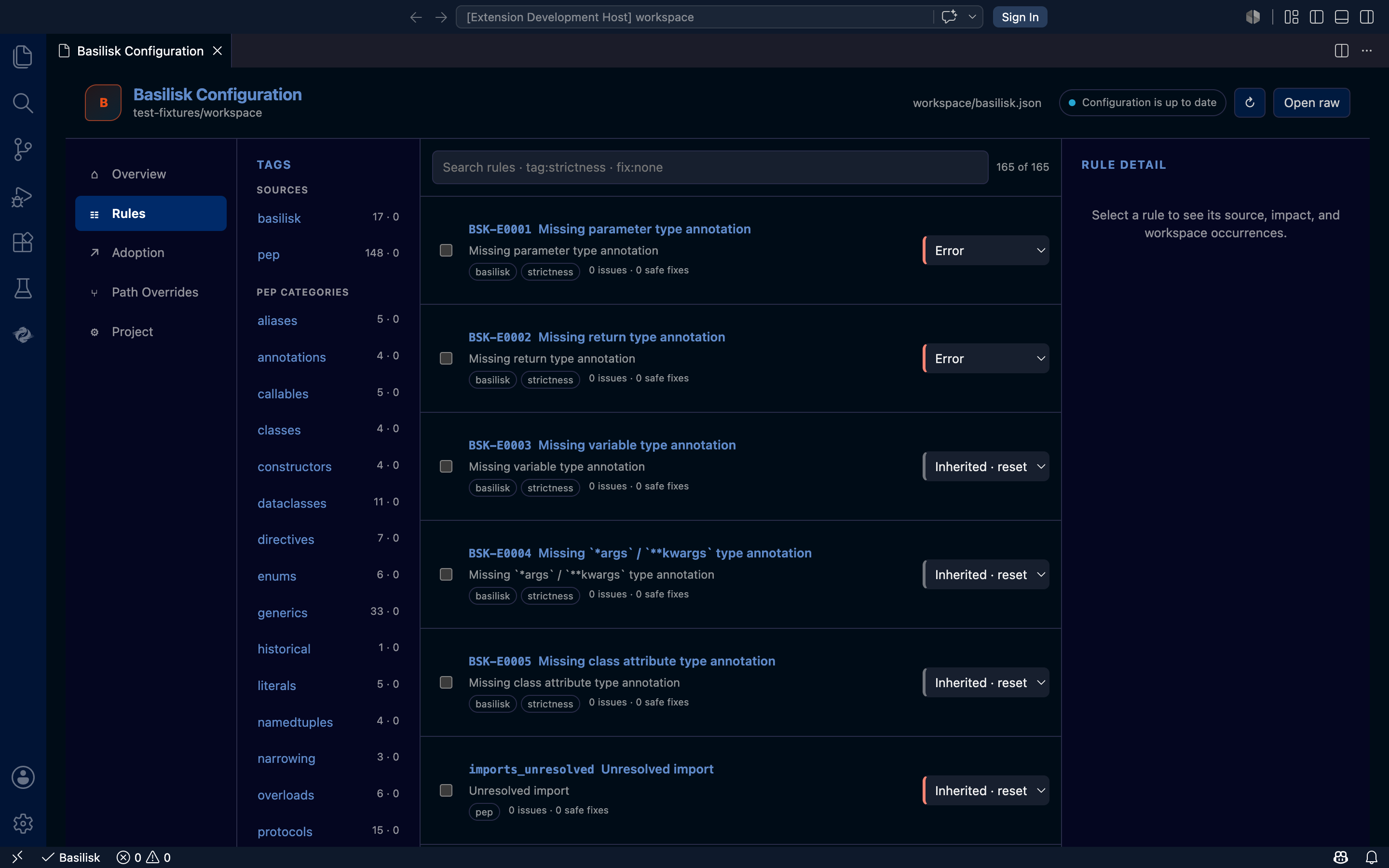
Visual configuration editor
The tag-first VS Code editor reads the live rule catalog from the LSP,
previews bulk changes, and shows every rule's effective severity and where it
was decided. Its edits are typed mutations the LSP applies to the active
pyproject.toml — set or remove a rule entry, a tag entry, a typeshed setting,
or a caching setting; requesting disabled for a PEP rule is rejected as an
error. The
extension never parses or writes configuration files itself, and folder
configs back the editor's scoped-grading view.
Track the authoritative specification and implementation plan.