Introduction
Basilisk is a complete, open-source Python language server. Everything you rely on a modern Python extension for — autocomplete, go-to-definition, hover information, refactoring, diagnostics, integrated debugging, profiling — Basilisk does too, fully open source and conformant to the Python typing spec by default.
It is also the only Python type checker with a perfect 100% score on the official python/typing conformance results — published on the Python typing repository's own leaderboard, ahead of Pyright, mypy, Pyrefly and ty. See how we measure it, or weigh up the best Python type checker for your project in the comparison.
It is not just a type checker. It is a feature-complete LSP with first-class extensions for VS Code, Cursor, Windsurf, Zed, and Neovim — plus any other editor that speaks the Language Server Protocol. JetBrains support is planned. No proprietary extension, no Node.js — a single Rust binary, the same experience in every editor.
The problem Basilisk solves
Pylance is the default Python language extension in VS Code. It is also proprietary — you cannot inspect, modify, or redistribute it. Pyright, the open-source type checker underneath, is powerful but is only a type checker — it does not provide completions, hover, go-to-definition, or refactoring without the proprietary Pylance wrapper.
Every other Python type checker (mypy, ty, Pyrefly) is only a checker — no completions, no refactoring, no debugger. You assemble a language server separately and keep the two in step across the team.
Basilisk takes a different position. Its default is the typing spec — full PEP conformance out of the box — and it brings the whole stack (type checking, language features, debugging, profiling) into a single open-source tool that runs the same in every editor, not just VS Code. Want checking stricter than the spec? Switch on the opt-in Basilisk rules. Type annotations are contracts, not documentation.
What Basilisk is
- A full-featured language server (LSP) — autocomplete, go-to-definition, hover, find references, rename, a full refactoring suite, code actions, inlay hints
- Editor extensions across major editors — VS Code, Cursor, Windsurf, Neovim (0.10+), and Zed today; JetBrains (IntelliJ / PyCharm) is planned
- Annotation quick-fixes — one-click code actions that insert a placeholder annotation (
: Any,-> None) on unannotated code, so you can fill in the real type - An integrated debugger — press F5 to debug Python with breakpoints, stepping, variable inspection, and watch expressions, all brokered through the Basilisk LSP
- An integrated profiler — sampling CPU profiler with inline heatmap annotations, flame graphs, memory leak detection, and reference graph visualization, all inside your editor
- A PEP-conformant type checker by default — the core spec rule set out of the box, with opt-in Basilisk rules for checking stricter than the spec
- Standard-library types out of the box — a complete typeshed
stdlib/tree is compiled into the binary and checking never downloads anything, so stdlib types work with no network and no configuration; pin an exactpython/typeshedcommit and it is verified offline against your local store - A CLI tool for CI integration — exits with code 1 when errors are found
- A migration assistant that reads your existing
pyrightconfig.jsonormypy.ini - uv integration — workspace detection, lock file parsing, and package management commands
- Written in Rust — ships as a single binary with no runtime dependencies
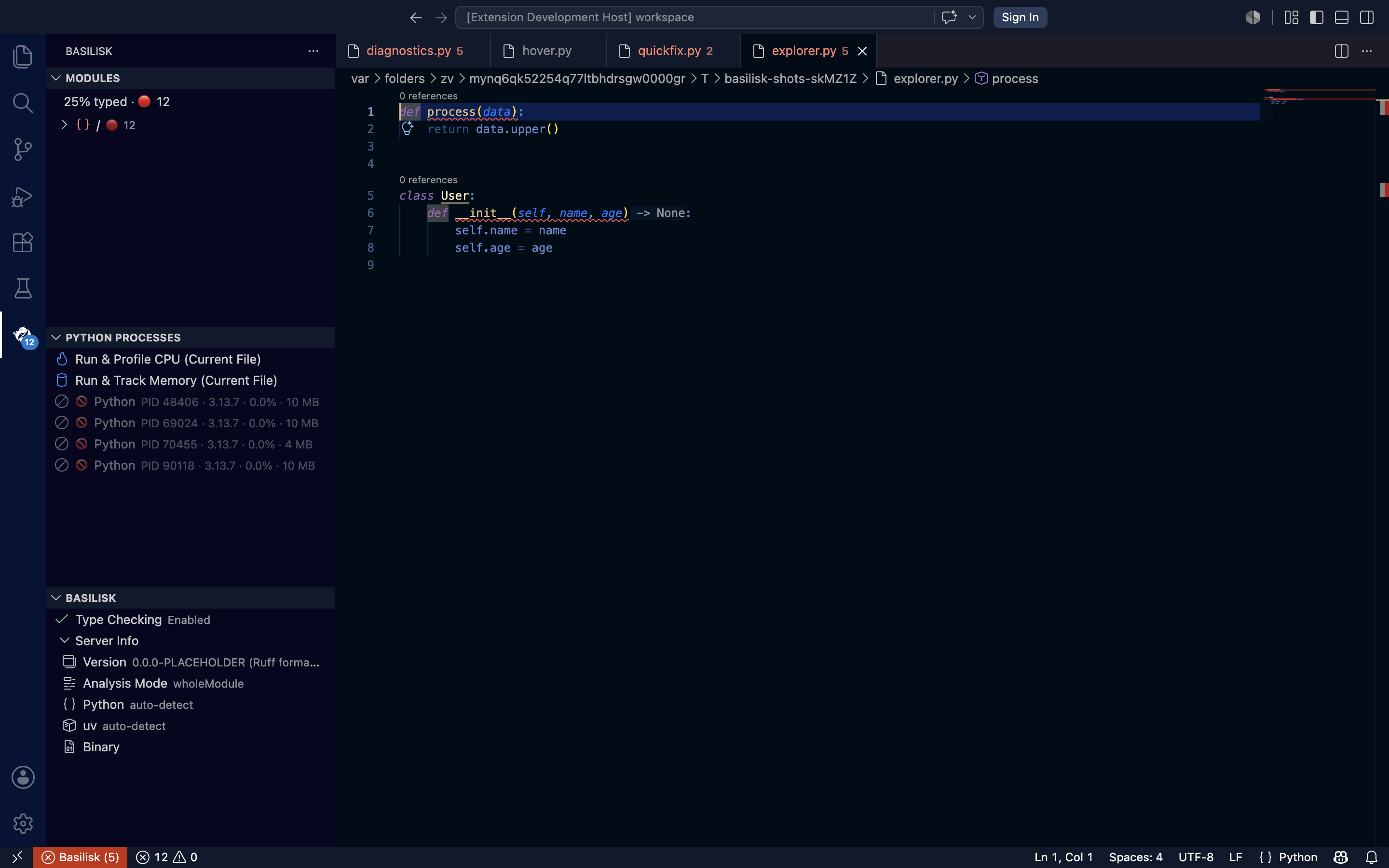
The Basilisk activity panel: module type-coverage, one-click CPU/memory profiling, and live server status.
What Basilisk is not
- Not a compiler — your Python code runs on CPython as normal
- Not a runtime type checker — analysis happens statically at development time
- Not tied to one editor — the same server powers VS Code, Cursor, Windsurf, Zed, and Neovim
Conformant by default, configurable from there
Basilisk's behaviour is decided entirely by configuration, and the default configuration is exactly the core PEP conformance rule set — the same rules the official typing-conformance suite grades. Out of the box you get a checker that follows the spec, with no flags to remember.
Stricter-than-spec checking is opt-in. Basilisk also ships extra rules the spec doesn't define — require an annotation on every parameter and return, a redundant-annotation warning, a missing-@override nudge, an explicit-Any nudge. They stay off until you enable them in config. Because they flag code the spec considers valid, turning them on deliberately trades strict spec conformance for a stricter standard of your team's choosing — a per-project choice, never a default.
Configuration is also where you relax rules for the paths that need it — place a pyproject.toml with a [tool.basilisk] table in the folder, and the nearest deciding table wins for the files beneath it:
# legacy/pyproject.toml
[tool.basilisk.rules]
"returns_compatibility" = "warning"   # graded down for legacy code only
"imports_unresolved" = "info"
This keeps the default honest — pure spec conformance — while letting each team dial strictness exactly where they want it.
Project status
Basilisk is under active development — the core checker, LSP server, and editor extensions are all working, and it is the only checker with a perfect score on the official python/typing conformance suite. Autocomplete, go-to-definition, hover, diagnostics, inlay hints, refactoring, debugging, and profiling are shipping today.
| Phase | Milestone | Status |
|---|---|---|
| 1 | Parser, resolver, type checker, CLI | Complete |
| 2 | LSP server, editor extensions (VS Code, Cursor, Zed, Neovim) | Complete |
| 3 | Expanded rule set, PEP conformance (100% against python/typing@main), gradual adoption |
In progress |
| 4 | Ownership & immutability analysis (Mojo-inspired) | Planned |
| 5 | WASM plugins, Django/Pydantic/SQLAlchemy | Planned |
| 6 | SARIF/JUnit output, JetBrains extension | Planned |
| 7 | Plugin marketplace, community stubs, ecosystem | Planned |
Architecture
Basilisk is a Cargo workspace with 19 Rust crates, each owning one layer of the system:
| Layer | Crates |
|---|---|
| Analysis pipeline | basilisk-parser → basilisk-resolver → basilisk-checker → basilisk-cli |
| LSP & infrastructure | basilisk-lsp, basilisk-db, basilisk-config, basilisk-stubs, basilisk-uv, basilisk-common, basilisk-buildinfo, basilisk-profiler-helper, basilisk-profiler-protocol |
| Typeshed downloads | basilisk-typeshed-fetch — the workspace's only HTTP client; it downloads typeshed on an explicit user action, strictly segregated from checking |
| Test infrastructure | basilisk-test-utils, basilisk-test-macros |
| Editor extensions | VS Code (vscode-extension), Neovim (basilisk.nvim), Zed (basilisk-zed) |
| Future | basilisk-mojo (ownership), basilisk-compiler (native), WASM plugins |
Next steps
- Install Basilisk — PyPI (
uv tool install), Homebrew, Scoop, your editor's marketplace, or build from source - Quick Start — your first type check in under 5 minutes
- Refactoring — the full refactoring suite (extract, inline, move, rename, convert)
- Debugging — set breakpoints, step through code, inspect variables
- Profiler — CPU heatmaps, flamegraphs, memory leak detection, and reference graphs
- All Rules — browse every BSK-E and BSK-W diagnostic code